
Draft from sources
Create editable first-pass summaries, descriptions, FAQs and guidance from uploaded or registered source material.
The AI event content assistant is the section-drafting capability inside Event Growth Studio, not the system that approves or publishes pages. It drafts, refines and adapts content from trusted sources and protected facts while your team edits, approves and publishes.
Structured for discovery. Assisted by AI. Approved by your team.
Conceptual workflow
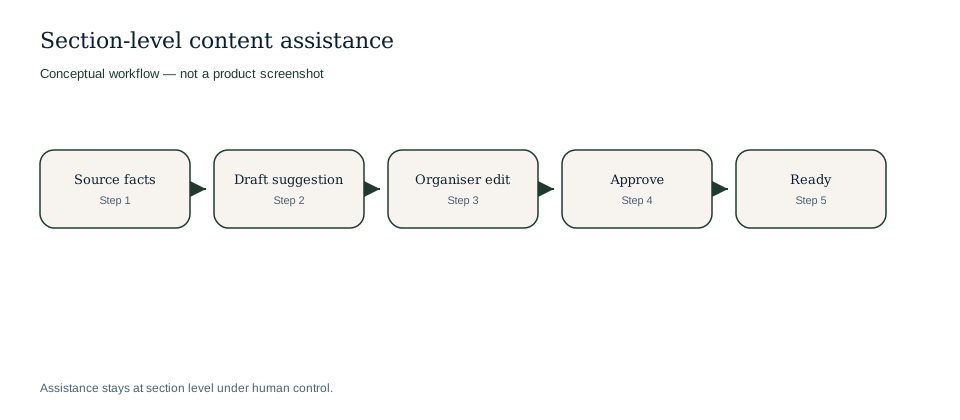
Section assistance under human control.
Conceptual workflow
Conceptual workflow. Assistance does not publish autonomously.
The assistant is designed for practical section work inside the structured digital event guide.
Create editable first-pass summaries, descriptions, FAQs and guidance from uploaded or registered source material.
Improve dense programme, venue or partner copy while preserving facts for reviewer checks.
Turn approved event information into audience, sponsor, media or visitor-focused drafts while rights, embargoes, journalist access and publication decisions stay with reviewers.
Identify practical audience questions that may need content, sources or owner review.
Example only: these are written content examples, not screenshots or fake product UI.
| Source material | Assistant draft could help with | Reviewer remains responsible for |
|---|---|---|
| Speaker bio says the founder leads a circular-fashion studio and speaks on Sunday at 14:00. | A concise speaker page summary and a short programme teaser. | Job title, talk time, claims about expertise and permission to publish the bio. |
| Venue note explains step-free entrance via Gate B and limited street parking. | Visitor arrival guidance and accessibility FAQ wording. | Current access route, parking policy and whether the wording is clear enough for attendees. |
| Partner submission describes a sponsor activation and brand offer. | Sponsor directory copy and a campaign snippet for review. | Commercial claims, offer terms, brand usage rights and approval from the sponsor owner. |
Source material
Speaker bio says the founder leads a circular-fashion studio and speaks on Sunday at 14:00.
Assistant draft could help with
A concise speaker page summary and a short programme teaser.
Reviewer remains responsible for
Job title, talk time, claims about expertise and permission to publish the bio.
Source material
Venue note explains step-free entrance via Gate B and limited street parking.
Assistant draft could help with
Visitor arrival guidance and accessibility FAQ wording.
Reviewer remains responsible for
Current access route, parking policy and whether the wording is clear enough for attendees.
Source material
Partner submission describes a sponsor activation and brand offer.
Assistant draft could help with
Sponsor directory copy and a campaign snippet for review.
Reviewer remains responsible for
Commercial claims, offer terms, brand usage rights and approval from the sponsor owner.
The assistant supports content inside the guide, not layout invention or publication authority. Human review and source control remain central.
A typical content workflow keeps source material, AI drafting and approval separate inside the structured guide.
Work inside a specific guide section rather than asking for a whole site or layout in one prompt.
Use event facts, approved copy, documents, biographies or venue notes as drafting context.
Create an editable section candidate that reviewers can accept, revise or reject.
Review claims, dates, price references, rights, credits and practical details before approval.
Approved content can move toward publishing; draft content stays out of the public page.
The assistant is most useful when teams have real source material but need faster content production.
Turn schedule and session notes into readable audience guidance.
Adapt biographies into page sections while preserving source ownership.
Draft venue, travel, accessibility and arrival information from approved facts.
Create sponsor or exhibitor page sections from approved partner submissions.
Explore connected Event Growth Studio workflows without leaving the creation and CMS cluster.
It can draft and refine section-level guide content such as summaries, FAQs, visitor guidance, biographies and promotional variants from trusted sources. It does not invent layouts.
No. AI drafts remain subject to human review and approval before any page is published. It does not decide media rights, embargoes, journalist access or whether press material becomes public.
It can reference read-only ticket facts as source context, but it does not become the ticketing authority or rewrite checkout logic.
No. It helps teams accelerate structured drafting and editing while people remain responsible for judgement, tone and accuracy.
No. It can help produce clearer and more complete content, but rankings, rich results and AI citations are not guaranteed.
Bring trusted event material into intake and the source library before asking AI to draft a page section.
Route drafts through review, preview and microsite publishing instead of letting AI decide what goes live.
Reuse approved event sections for discoverability and promotional outputs from the same controlled guide.
Source-first drafting.
Human approval stays central.