
Event Growth Studio

Run an event microsite alongside your website — or as the event site

The event microsite platform is the deployment layer for an Event Growth Studio guide, not the whole parent product promise. Use it beside your organisation website for deep event discovery, or make it the official event site when the event needs its own public home.

Structured for discovery. Assisted by AI. Approved by your team.

Conceptual workflow

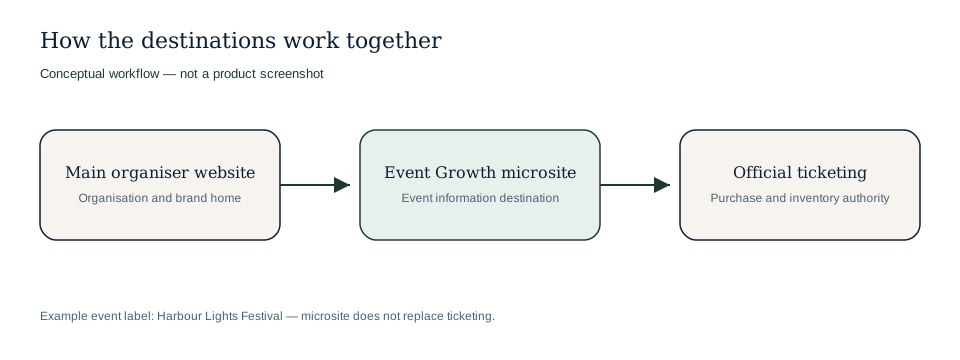
Conceptual diagram relating the organiser website, Event Growth microsite and official ticketing.

Deployment relationship — microsite does not replace ticketing.

Conceptual workflow

How the microsite sits beside your website and ticketing

Keep organisation storytelling on your main site, deepen the event on the microsite, and leave purchase authority with official ticketing.

Organiser website connects to an Event Growth microsite, which points visitors to official ticketing.

Harbour Lights Festival (example event) — complementary destinations.

Additive by default, complete enough to stand alone

Different event teams need different operating models. The microsite platform supports both without pretending to replace every system around the event.

Complementary mode

  • Use the guide for deep event content while the main website carries organisation, brand and corporate context.
  • Link from existing campaign, venue, partner or organiser pages to detailed event information.
  • Keep ticketing and commerce flows in their existing systems.

Official-site mode

  • Use the guide as the primary event destination when the event needs its own complete audience experience.
  • Create page families for programme, tickets, venue, access, sponsors, visitor guidance and optional controlled Media publication.
  • Publish approved pages independently as content becomes ready.

Example: organisation website jobs vs event microsite jobs

Example only: a city arts organisation might keep corporate information on its main website while using the event microsite for the festival audience journey.

  • Website area

    Organisation website

    Typical job

    Explain the organiser, year-round work and membership.

    Example content

    About the organisation, board information, venue portfolio, annual supporters and hiring enquiries.

  • Website area

    Event microsite

    Typical job

    Answer event-specific discovery and attendance questions.

    Example content

    Festival programme, day-by-day schedule, venue access, ticket options, sponsor pages and visitor FAQs.

  • Website area

    Ticketing system

    Typical job

    Remain the authoritative purchase and inventory flow.

    Example content

    Live prices, availability, checkout, orders, payment confirmation and scanning rules.

What the digital event guide platform manages

The platform focuses on the event content estate and discovery destination rather than commerce infrastructure.

Page families

Create structured event pages for core information, discovery journeys and supporting audience questions.

Review states

Keep draft, review, approved and published work visible across the page estate.

Private preview

Review the real digital event guide experience before pages become public.

Approved promotion source

Use approved page content as the source for campaign, partner and audience assets.

Designed to sit beside operational systems

Event Growth Studio does not replace checkout, payments, orders, inventory, availability or scanning. Those operational responsibilities stay with ticketing and access systems. The microsite platform helps marketing and content teams present complete, governed event information around those systems.

  • Ticket buying paths can point to the authoritative ticketing flow.
  • Read-only ticket facts can inform content without becoming the system of record.
  • Audience content can evolve without changing commerce infrastructure.

Digital guide lifecycle

The platform supports the full content lifecycle from creation to improvement.

  1. 1

    Plan the content estate

    Identify the structured pages audiences, partners, search engines and AI search and answer systems need.

  2. 2

    Draft from sources

    Use source material and AI assistance to create page sections.

  3. 3

    Approve page by page

    Let owners review each page before it becomes publishable.

  4. 4

    Publish selectively

    Release approved pages while holding incomplete pages back.

  5. 5

    Improve over time

    Fill content gaps as programmes, partners and visitor needs change.

Frequently asked questions

Can the microsite live alongside our current website?+

Yes. Keep your existing website as the home of your organisation and add Event Growth Studio as the complete discovery destination for the event.

Can the microsite be the main event website?+

Yes, when that is the right model. The platform can support a complete public home of the event with multiple structured page families.

Does it handle payments or scanning?+

No. Checkout, payments, orders, inventory and scanning remain outside Event Growth Studio.

Can different pages publish at different times?+

Yes. Page-level publishing allows one approved page to go live while another remains in review.

Does Media have to be public on the microsite?+

No. Media can stay disabled, private or restricted. A public Media page is optional and should only publish when the organiser enables and approves it.

Choose the right event-site model

Launch a deeper event destination without losing the governed guide behind it.

Use the microsite beside your organisation website when the event needs more depth than the main site can comfortably hold.

Use it as the official event site when the event needs a complete public home of its own.

Keep the full guide connected to Event Growth Studio, official ticketing, and the discoverability foundations that help people understand the event.

Additive by default.

Official-site capable when needed.

Tell me more