
Core event page
The main destination for the proposition, audience promise, proof and ticket path.
Guided creation is the setup workflow inside Event Growth Studio, not the full parent platform or a publishing shortcut. It helps teams choose page families, connect source material, populate sections and prepare a full digital event guide or microsite without asking AI to design layouts.
Structured for discovery. Assisted by AI. Approved by your team.
Conceptual workflow
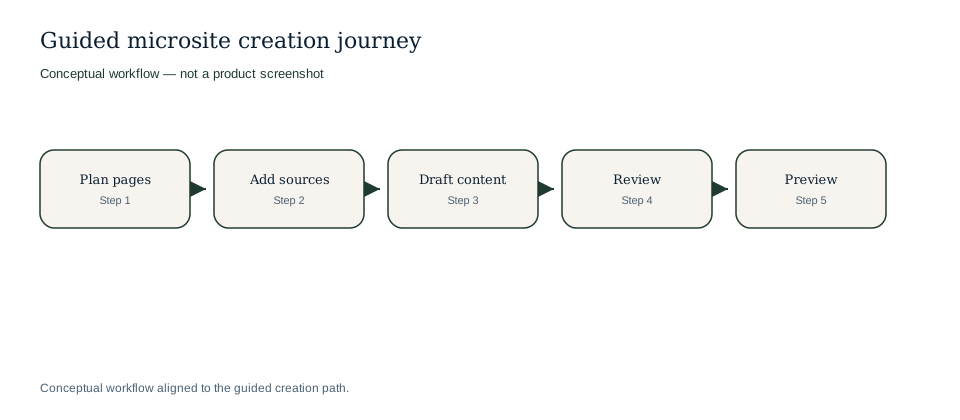
Guided journey from plan to preview.
Conceptual workflow
Conceptual workflow aligned to guided creation.
The guided flow gives marketers a repeatable path from initial event facts to a private preview of the complete guide.
Define the audience, commercial goal and level of detail the digital event guide must support.
Select the parent event page and supporting page types such as programme, venue, ticket and partner pages.
Bring in event names, dates, locations and ticket facts without making generated copy the authority.
Upload or register briefs, PDFs, biographies, media, sponsor copy and visitor information.
Select recommended sections inside purpose-built templates so the guide starts complete rather than sparse.
Use AI assistance to populate summaries, descriptions, FAQs and audience guidance from trusted inputs.
Keep provenance, ownership and stale-content signals available to reviewers.
Ask the right people to check claims, compliance, tone and operational accuracy.
Review the private digital guide or microsite experience before any page goes public.
Release approved pages independently and keep unfinished pages in draft or review.
Example only: the workflow can turn common organiser inputs into a structured page plan before drafting begins.
| Organiser provides | Guided creation suggests | Stays human-controlled |
|---|---|---|
| Event brief, audience notes and exhibitor list. | Core event page, exhibitor directory and sponsor page family. | Which partners appear publicly and which descriptions are approved. |
| Agenda PDF and speaker biographies. | Programme pages, session sections and speaker profile sections. | Session claims, speaker titles and schedule accuracy. |
| Venue guide, accessibility notes and ticket link. | Visitor information, access FAQ and official ticket call-to-action placement. | Practical details, ticket wording and publication timing. |
Organiser provides
Event brief, audience notes and exhibitor list.
Guided creation suggests
Core event page, exhibitor directory and sponsor page family.
Stays human-controlled
Which partners appear publicly and which descriptions are approved.
Organiser provides
Agenda PDF and speaker biographies.
Guided creation suggests
Programme pages, session sections and speaker profile sections.
Stays human-controlled
Session claims, speaker titles and schedule accuracy.
Organiser provides
Venue guide, accessibility notes and ticket link.
Guided creation suggests
Visitor information, access FAQ and official ticket call-to-action placement.
Stays human-controlled
Practical details, ticket wording and publication timing.
The workflow helps teams see which guide pages are missing before launch pressure makes them urgent.
The main destination for the proposition, audience promise, proof and ticket path.
Structured schedules, performer profiles, session context and discovery-friendly detail.
Venue, travel, accessibility, food, hospitality and practical audience guidance.
Sponsor, exhibitor and optional Media outputs can be prepared from approved sources while public Media pages stay disabled until organisers enable them.
AI helps after the event structure and source material are in place. It can populate first-pass sections, summarize long source documents, suggest FAQs and adapt approved content for related pages. It cannot design layouts, approve pages, publish pages or replace human checks.
Guided creation connects the first launch cohort from the parent product into the public microsite and discoverability layers.
Explore connected Event Growth Studio workflows without leaving the creation and CMS cluster.
No. It recommends and structures the work, but your team chooses the page set, sources and sections that move forward.
Yes. Pages can begin in draft while missing sources are added, but uncertain or stale material should be reviewed before approval.
No. Existing events can use it to fill gaps, rebuild sparse pages or prepare a dedicated digital event guide or microsite alongside a current website.
No. AI-assisted sections remain subject to human review before publication.
Use guided creation to decide which pages the event actually needs.
Keep drafting and review grounded in approved event sources rather than free-form prompts.
Move from Event Growth Studio into a reviewed microsite, then strengthen discoverability from the same approved content.
Structured before drafting.
Reviewed before publishing.